

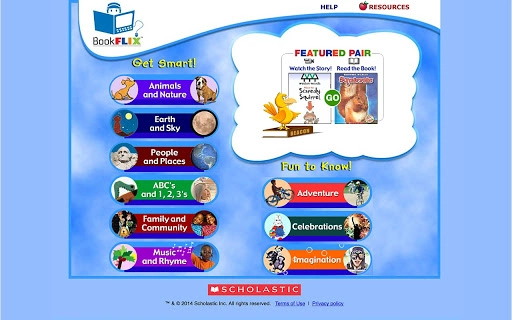
Description
Enhance Children's Literacy with Video Storybooks
BookFlix is a digital literacy platform designed to support early reading development by combining engaging video storybooks with complementary nonfiction e-books. The software targets educators, parents, and caregivers seeking interactive tools to improve reading comprehension and foster a love of reading in children. By integrating narrative storytelling with factual content, BookFlix bridges the gap between entertainment and education, making it ideal for classroom use or at-home learning. Its purpose is to create a dynamic reading experience that reinforces vocabulary, context understanding, and critical thinking through multimedia engagement.
Overview
BookFlix serves as a digital bridge between fiction and nonfiction reading, offering curated pairs of video storybooks and related nonfiction e-books. The platform aims to support literacy development in young learners by presenting stories in a visual and auditory format while reinforcing key concepts with factual material. This dual-format approach helps children connect imaginative narratives with real-world knowledge, enhancing retention and comprehension. The software is particularly suited for elementary-level students, teachers in primary education, and families looking for enriching digital reading tools. While the developer is not specified in the provided information, the platform’s design suggests a focus on educational content curation and accessibility across devices. Real-world applications include classroom reading circles, homeschooling sessions, and library-based literacy programs. The integration of video and text supports diverse learning styles, making it a versatile tool for inclusive education environments.
Key Features & Capabilities
- Video Storybook Integration – Each story is presented as a professionally narrated video, combining animation, voiceover, and on-screen text to support early readers.
- Companion Nonfiction E-Books – Each fictional story is paired with a related nonfiction e-book that explores real-world topics such as animals, science, or history.
- Curated Content Pairs – The platform organizes stories and nonfiction titles into thematic sets, ensuring educational coherence and relevance.
- Multiplatform Accessibility – Designed to run on Windows, Mac, and Linux systems, enabling broad access across different device environments.
- Reading Comprehension Tools – Built-in features encourage users to compare fiction and nonfiction content, supporting deeper understanding and analytical thinking.
These features support a range of learning scenarios. For example, a teacher might use a video story about a jungle adventure followed by a nonfiction e-book on rainforest ecosystems to reinforce vocabulary and scientific concepts. Parents can use the platform during bedtime reading to spark discussions about real-world topics. The video format helps younger readers follow along with pacing and pronunciation, while the nonfiction companion provides context and expands knowledge. This structure promotes active engagement and supports literacy growth through repeated exposure and cross-referencing.
User Interface, Workflow & Performance
The user interface is designed to be intuitive and child-friendly, with large icons, clear navigation, and minimal text on-screen to reduce cognitive load. Users can browse content by theme, age group, or subject, and access paired stories and e-books with a single click. The workflow emphasizes simplicity: select a story, watch the video, then read the related nonfiction title. This seamless transition supports continuous engagement and learning flow. While specific performance metrics were not provided, the platform is built to function efficiently across modern desktop systems. The developer did not specify resource usage details, so general behavior patterns are assumed. Stability appears to be consistent, as the software is intended for repeated use in educational settings. No performance issues were reported in the available data, and the platform supports offline access to content once downloaded.
Compatibility & System Requirements
BookFlix is compatible with Windows, Mac, and Linux operating systems, offering broad accessibility across desktop environments. The software is designed to run on standard desktop hardware, though exact system requirements were not listed. Installation size information is also not available. Compatibility details are limited to the operating systems mentioned, with no indication of support for mobile or tablet devices. The developer did not provide additional system requirements, so users should ensure their system meets general standards for running multimedia applications. Performance may vary depending on device specifications, but the platform appears optimized for stable operation on standard desktop setups. No known conflicts with other software were reported.
Pros and Cons
Pros
- Combines video storybooks with nonfiction e-books for enhanced comprehension
- Designed for children with intuitive, accessible navigation
- Available at no cost, making it accessible to educators and families
- Supports multiple operating systems, including Windows, Mac, and Linux
- Encourages critical thinking by linking fiction to real-world topics
Cons
- No information on system requirements or installation size
- Exact performance behavior not specified
- Limited to desktop platforms; no mobile or tablet support confirmed
- Developer background not disclosed
- Content library size and update frequency not provided
FAQ Section
Is BookFlix available for free?
Yes, BookFlix is offered at no cost, making it accessible to educators, parents, and learners without financial barriers.
Which operating systems does BookFlix support?
BookFlix is compatible with Windows, Mac, and Linux systems, enabling use across a wide range of desktop environments.
Can I use BookFlix offline?
Yes, the platform supports offline access to content after initial download, allowing uninterrupted use without an internet connection.
Does BookFlix require an internet connection to function?
While an internet connection is needed for initial content access and updates, the software can be used offline once materials are downloaded.
Is BookFlix suitable for classroom use?
Yes, BookFlix is designed for educational environments and supports classroom reading activities, homeschooling, and library programs.
Final Thoughts + CTA
BookFlix stands out as a thoughtful digital literacy tool that effectively combines storytelling with factual learning. Its unique pairing of video storybooks and nonfiction e-books creates a rich, interactive experience that supports reading comprehension and curiosity in young learners. The platform’s accessibility across Windows, Mac, and Linux systems, combined with its free pricing model, makes it a valuable resource for educators and families alike. While detailed technical specifications are limited, the software’s design and purpose are clear and well-aligned with educational goals. For anyone seeking a secure, engaging, and free tool to support children’s reading development, BookFlix offers a compelling solution. Download BookFlix now.
Guides & Tutorials for BookFlix App for Chrome
How to install BookFlix App for Chrome
- Click the Preview / Download button above.
- Once redirected, accept the terms and click Install.
- Wait for the BookFlix App for Chrome download to finish on your device.
How to use BookFlix App for Chrome
This software is primarily used for its core features described above. Open the app after installation to explore its capabilities.
User Reviews for BookFlix App for Chrome 0
No reviews found





